


Install RabbitMQ on OpenShift
It is time to consider moving your RabbitMQ to OpenShift or at least to a Kubernetes environment. There are many benefits: resource savings, increased operational speed, declarative approach, rapid scaling when needed, security.
Requirements
Before starting, it is good to remember a few requirements; however, it is advisable to check the official documentation because evolution is rapid:
- Kubernetes cluster version 1.19 or above;
- Storage Class for persistent volumes;
- (optional) worker node in 3 different availability zone.
- (optional) certificate for SSL client connection.
Install Operator with OperatorHub
The installation of RabbitMQ on Openshift will be done in cluster wide mode. This mode allows RabbitMQ instances to be created via the operator unrelated to the project, thus allowing multitenant management of the product. The installation involves the release of two operators on Openshift:
- RabbitMQ Cluster Operator, which allows the creation and management of RabbitMQ instances deployed on the cluster.
- RabbitMQ Messaging Topology Operator, which allows the creation of RabbitMQ objects directly via Openshift.
Note
The RabbitMQ Messaging Topology Operator will be used later in the second part of the article.
Two methods can be used for installation, the openshift console or via manifest.
Install via Console
- Log in to the OpenShift console
- Click on Operators > OperatorHub on the left menu
- Search RabbitMQ Cluster Operator
- Click on RabbitMQ Cluster Operator, select Manual as Update Approval for production
- Click on Install
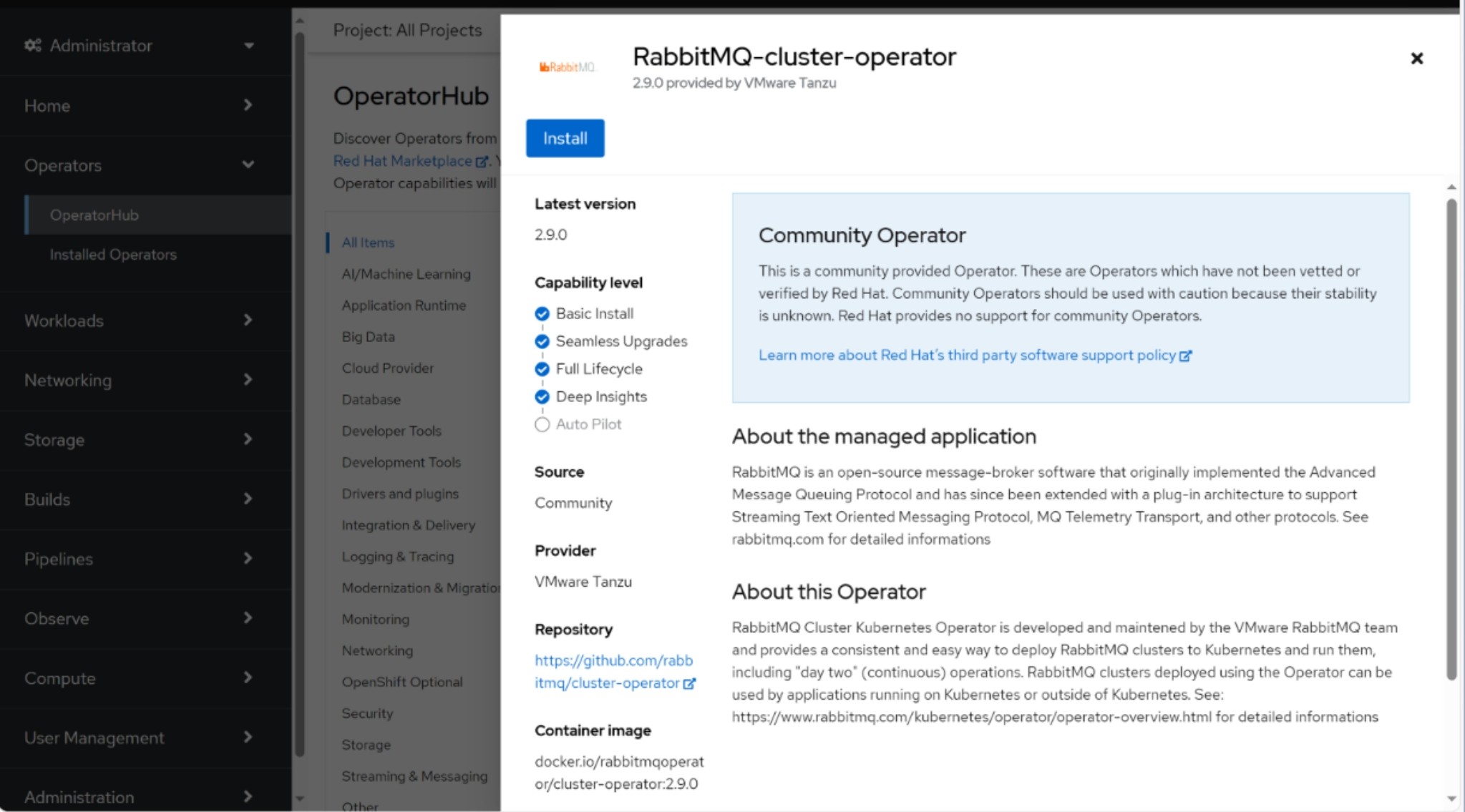
Install via Manifest
- Log in with oc client
- Copy and apply this manifest
- Approve the install plan
For RabbitMQ Cluster Operator apply this:
apiVersion: operators.coreos.com/v1alpha1
kind: Subscription
metadata:
  name: rabbitmq-cluster-operator
  namespace: openshift-operators
spec:
  channel: stable
  installPlanApproval: Manual
  name: rabbitmq-cluster-operator
  source: community-operators
  sourceNamespace: openshift-marketplace
  startingCSV: rabbitmq-cluster-operator.v2.9.0
An install plan has been created but not executed as it has not been approved:
oc get installplan -n openshift-operators

NAME            CSV                                                  APPROVAL APPROVED
install-dq68d   rabbitmq-cluster-operator.v2.9.0-xxxxxx              Manual   false
Approve the installation of the operator by updating the approved field of the InstallPlan:
oc patch installplan install-dq68d --namespace openshift-operators --type merge --patch '{"spec":{"approved":true}}'
Provide external connection to clients 🐑
In a scenario where the applications that will use RabbitMQ are deployed in OpenShift, the connection to the RabbitMQ clusters is not a problem, just provide the service as the connection endpoint. Whereas in a scenario where the applications that are to use RabbitMQ are external to OpenShift it must be remembered that:
Info
The OpenShift router allows access to HTTP/HTTPS traffic and TLS-encrypted protocols other than HTTPS (for example, TLS with the SNI header).
It means that we can expose protocols other than HTTP/HTTPS as long as they are encrypted in TLS. So, is it possible to expose the RabbitMQ service via a route?
The answer is Yes!
We will configure RabbitMQ pods with a certificate to expose the service in TLS so that we can create passthrough routes.
Namespace preparation
The creation of a cluster requires the definition of a project
oc new-project rabbitmq-cluster
Now create a TLS-type secret, it is recommended to use the OpenShift route certificates, it is not necessary to generate new certificates because the routes will respect the naming convention: *.apps.<clustername>.<domain>.
oc -n rabbitmq-cluster create secret tls rabbitmq-tls --cert=tls.crt --key=tls.key
RabbitmqCluster definition
- The installed operator provides a CRD for the definition of RabbitMQ clusters:
apiVersion: rabbitmq.com/v1beta1
kind: RabbitmqCluster
metadata:
  name: rabbitmq
  namespace: rabbitmq-cluster
  annotations:
    rabbitmq.com/operator-connection-uri: 'https://mgmt-rabbitmq.apps.<clustername>.<domain>'   # The route name of rabbitmq management endpoint, is important define this annotation for Topology Operator, because the service is exposed in TLS
spec:
  image: 'rabbitmq:3.13.3-management'  # The version of the RabbitMQ image
  replicas: 3
  service:
    type: ClusterIP
  tls:
    secretName: rabbitmq-tls
  rabbitmq:
    additionalConfig: |
        amqp1_0.default_vhost = /
        amqp1_0.protocol_strict_mode = false
    additionalPlugins:
        - rabbitmq_amqp1_0
  tolerations:
  - key: node.kubernetes.io/not-ready
    operator: Exists
    effect: NoExecute
    tolerationSeconds: 60
  - key: node.kubernetes.io/unreachable
    operator: Exists
    effect: NoExecute
    tolerationSeconds: 60
  affinity:
    podAntiAffinity:
      preferredDuringSchedulingIgnoredDuringExecution:
      - weight: 100
        podAffinityTerm:
          labelSelector:
            matchExpressions:
              - key: app.kubernetes.io/name
                operator: In
                values:
                - rabbitmq
          topologyKey: kubernetes.io/hostname
  persistence:
    storage: 1Gi
  resources:
    requests:
      cpu: 1000m
      memory: 1Gi
    limits:
      cpu: 1000m
      memory: 1Gi
  override:
    statefulSet:
      spec:
        template:
          spec:
            containers: []
            securityContext: {}   # Important to add the securityContext empty for OpenShift, without does not work
- Check that the operator starts the pods in the namespace:
oc get pods -n rabbitmq-cluster

NAME                         READY   STATUS    RESTARTS   AGE
rabbitmq-instance-server-0   1/1     Running   0          15d
rabbitmq-instance-server-1   1/1     Running   0          47h
rabbitmq-instance-server-2   1/1     Running   0          15d
- It is now possible to create the OpenShift route to expose the services.
This is the first route to expose the RabbitMQ console:
kind: Route
apiVersion: route.openshift.io/v1
metadata:
  name: admin
  namespace: rabbitmq-cluster
spec:
  host: mgmt-rabbitmq.apps.<clustername>.<domain>
  to:
    kind: Service
    name: rabbitmq-instance
    weight: 100
  port:
    targetPort: management-tls
  tls:
    termination: passthrough
  wildcardPolicy: None
- This is the route to expose the RabbitMQ service used by external clients
kind: Route
apiVersion: route.openshift.io/v1
metadata:
  name: amqps
  namespace: rabbitmq-cluster
spec:
  host: amqps-rabbitmq.apps.<clustername>.<domain>
  to:
    kind: Service
    name: rabbitmq-instance
    weight: 100
  port:
    targetPort: amqps
  tls:
    termination: passthrough
    insecureEdgeTerminationPolicy: None
  wildcardPolicy: None
Production tips 🐑
The RabbitMQ cluster is deployed as statefullSet because the application needs state and data persistence. A peculiarity of statefullSets in Kubernetes is that they require manual operation by the administrator in the event of a fault of the worker node where the pod is scheduled because the pod remains stuck in a terminating state. This is designed behavior as the StatefulSet requires graceful shutdown and needs manual administration for data safety when a node is unreachable, down or lost.
To improve the high reliability of the RabbitMQ cluster in production environments, it is recommended to use a zonal deployment approach (AZ). Kubernetes provides the topologySpreadConstraints function. By configuring topology spread constraints, it is possible to ensure that workloads remain online even in the event of an outage or hardware failure in a zone. In addition, they provide a much finer level of control over the distribution of Pods and support the continuous updating of workloads and the smooth resizing of replicas.
This concept is more granular than anti-affinity, which only ensures that the pods that make up a RabbitMQ cluster are scheduled on different nodes. With the topologySpreadConstraints, it is guaranteed that the pods are scheduled on different nodes of different AZs.
To use this function, nodes are required to have a label identifying the zone in which they are located, an example:
# Datacenter 1
oc label node openshift-worker-01 topology.kubernetes.io/zone=dc1
oc label node openshift-worker-02 topology.kubernetes.io/zone=dc1

# Datacenter 2
oc label node openshift-worker-03 topology.kubernetes.io/zone=dc2
oc label node openshift-worker-04 topology.kubernetes.io/zone=dc2

# Datacenter 3
oc label node openshift-worker-05 topology.kubernetes.io/zone=dc3
oc label node openshift-worker-06 topology.kubernetes.io/zone=dc3
In this scenario we have 6 openshift nodes running on 3 different availability zones. In the RabbitmqCluster definition, simply add the following instruction:
oc edit rabbitmqcluster rabbitmq-cluster -n rabbitmq-cluster
apiVersion: rabbitmq.com/v1beta1
kind: RabbitmqCluster
metadata:
  name: rabbitmq
  namespace: rabbitmq-cluster
[...]
spec:
  [...]
  override:
    statefulSet:
      spec:
        template:
          spec:
            containers: []
            securityContext: {}
            topologySpreadConstraints:
              - labelSelector:
                  matchLabels:
                    app.kubernetes.io/name: rabbitmq
                maxSkew: 1
                topologyKey: topology.kubernetes.io/zone
                whenUnsatisfiable: DoNotSchedule
RabbitMQ Messaging Topology Operator
You can find out how to use RabbitMQ in kubernetes/openshift in the RabbitMQ on OpenShift - (Part 2)